
Description
In the modern workplace, asset and equipment management is an important component in maintaining operational efficiency, workplace safety, and accurate reporting on facility conditions. Many companies face challenges in ensuring that all equipment functions optimally, conducting timely inspections, and reporting accurately. Recognizing this need, the development of a periodic asset and equipment inspection application is necessary as a digital solution to help users, whether individuals, technicians, or operational managers, monitor, record, and evaluate asset conditions systematically and efficiently.
This application was born out of a real need in the field, where inspection and maintenance activities are often still carried out manually, using paper forms or spreadsheets that are prone to recording errors and data loss. In addition, it is not uncommon for the equipment condition evaluation process to be hampered by the difficulty of collecting reports from various locations or officers.
With this application, the inspection process can be carried out directly through digital devices such as laptops or tablets. All inspection data is automatically stored in the system, complete with asset identity, inspection time, and condition status. The main objectives of developing this application are:
• Improve the efficiency of the asset inspection and recording process.
• Ensure transparency and accuracy of equipment condition data.
• Facilitate monitoring of inspection and periodic maintenance status.
• Reduce paper usage and speed up inspection result reporting.
This application is also developed with user-friendly principles, meaning it is easy to use for anyone, including users who are not familiar with complex digital systems. The interface is clean, responsive, and intuitive, so inspections can be carried out quickly without disrupting main operational activities.
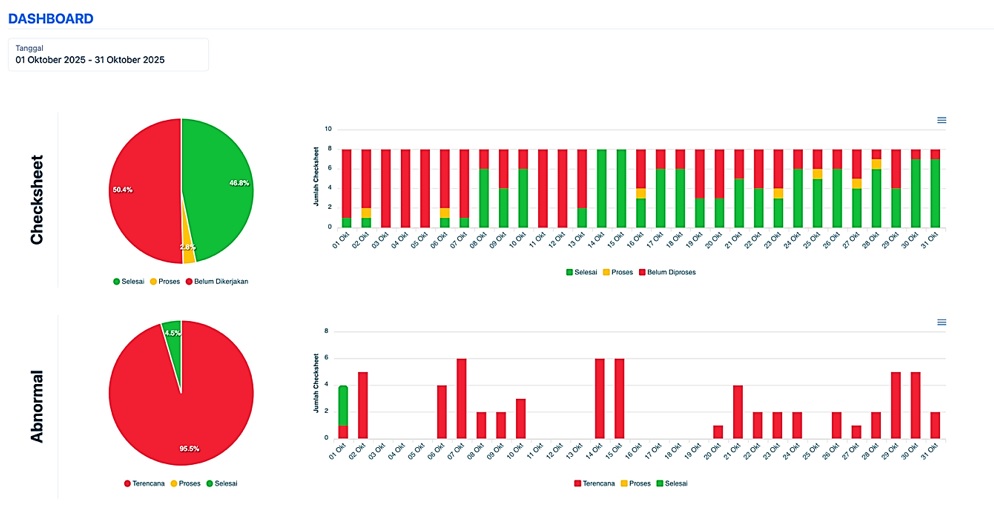
Key Features of the Application
Asset Recording
This feature allows users to add and manage a list of assets or equipment owned. Each asset has detailed information, such as:
• Asset name or unique identification code.
• Category or type of equipment.
• Serial number, date of purchase, and useful life.
Users can add new assets, update old data, or deactivate assets that are no longer in use. All data is stored in a structured manner, making it easy to search and report on later.
Asset Inspection Status (Normal/Abnormal)
Each time an inspection is performed, users can determine whether the asset's condition is normal or abnormal.
• If normal, the system will mark the asset as in good condition and ready for use.
• If abnormal, users can add explanatory notes (e.g., “leakage,” “loose components,” or “excessive temperature”).
This status can be used as a basis for the technical team or maintenance department to take further action, such as repairs, replacements, or additional inspections. The asset condition is also visualized in the form of easily recognizable colors and icons, for example, green for normal and red for abnormal.
Inspection Status
This application supports tracking the status of each asset inspection. Each entry will have a status such as:
• Not yet inspected
• Currently being inspected
• Inspection completed
With this status system, users or supervisors can easily find out which assets have been verified, which are currently being checked, and which have not yet been touched.
Inspection and Reporting History
Every inspection activity will be recorded, creating a complete inspection history. This history displays information such as:
• Date and time of inspection.
• Name or ID of the officer conducting the inspection.
• Asset status results (normal/abnormal).
• Additional notes or recommendations for further action.
This feature helps companies conduct internal and external audits, as all data is neatly stored and accessible at any time. Reports can also be downloaded in PDF format for documentation or analysis purposes.
Asset Dashboard and Statistics
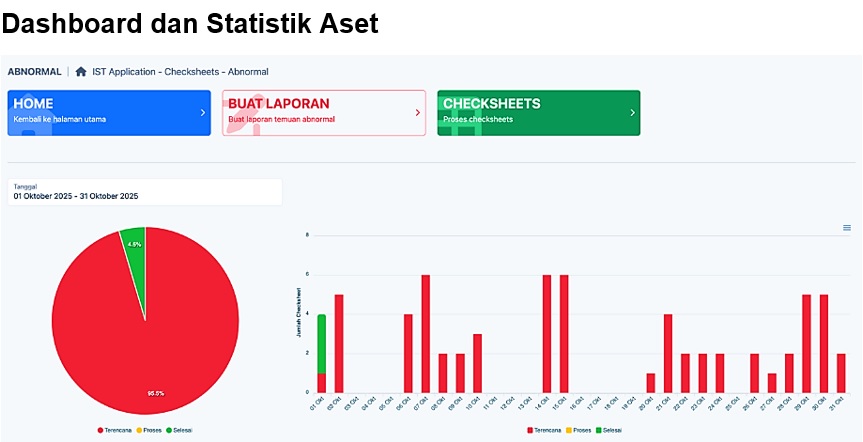
This application also features a dashboard that displays a summary of asset conditions in the form of graphs or diagrams. Users can view:
• Percentage of normal vs. abnormal assets.
• Number of inspections performed.
• Assets with the highest abnormal status.
• Equipment performance trends over time.
This dashboard makes it easier for management to make data-driven decisions, such as determining maintenance priorities or equipment replacement investments.
Technology used
This application is built using a combination of modern web-based (or mobile, depending on the development version) technologies, such as:
• Frontend: HTML5, CSS3, JavaScript for a responsive and interactive interface.
• Backend: PHP for data management and system logic.
• Database: MySQL for storing asset, user, and inspection history information.
• Authentication & Role Management: Login system with access rights settings to maintain data security.
With this technology, the application can be used across devices, including desktop computers, laptops, and tablets, without compromising performance and speed.
Benefits and Impact
The implementation of this application brings many tangible benefits to users, including:
1. Time efficiency – Inspections and recording are done digitally, reducing manual administration time.
2. High accuracy – Reduces the risk of input errors and document loss.
3. Report transparency – All inspection data can be accessed and verified at any time.
4. Real-time monitoring – Asset status can be monitored directly without waiting for manual reports.
5. Data-driven decisions – Inspection statistics help management determine more effective maintenance policies.
In addition, this application contributes to the implementation of paperless management principles, supporting operational efficiency while being environmentally friendly.
Development
This application is still being developed to make it more complete and adaptive to user needs. Some of the advanced features that will be added include:
• Integration with QR Code for automatic asset identification.
• WhatsApp notification support.
With this ongoing development, the application is expected to become a leading digital solution for asset management and inspection in various industries such as manufacturing, energy, healthcare, education, and government.
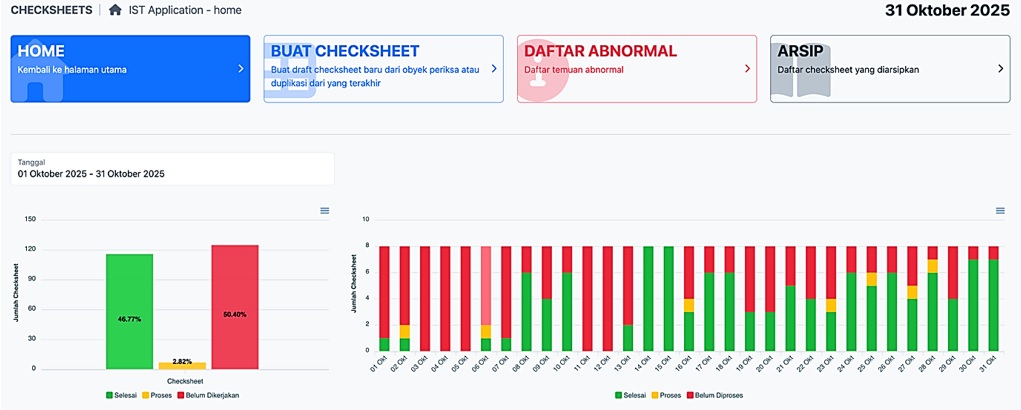
Checksheet Dashboard
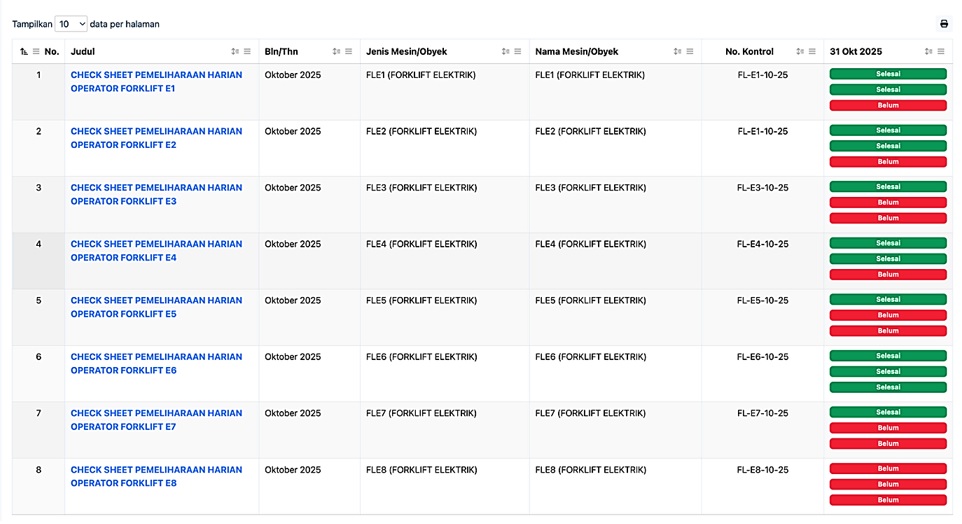
Checksheet List
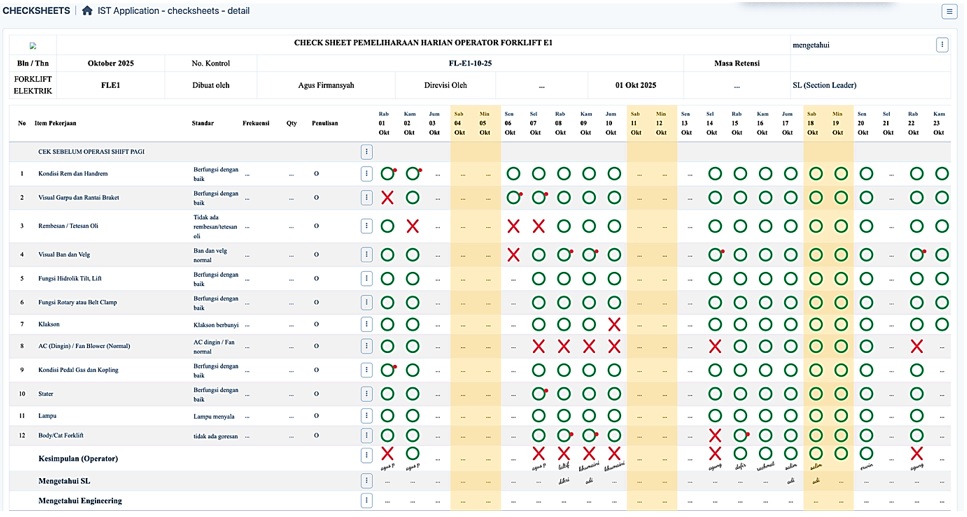
Checksheet Detail
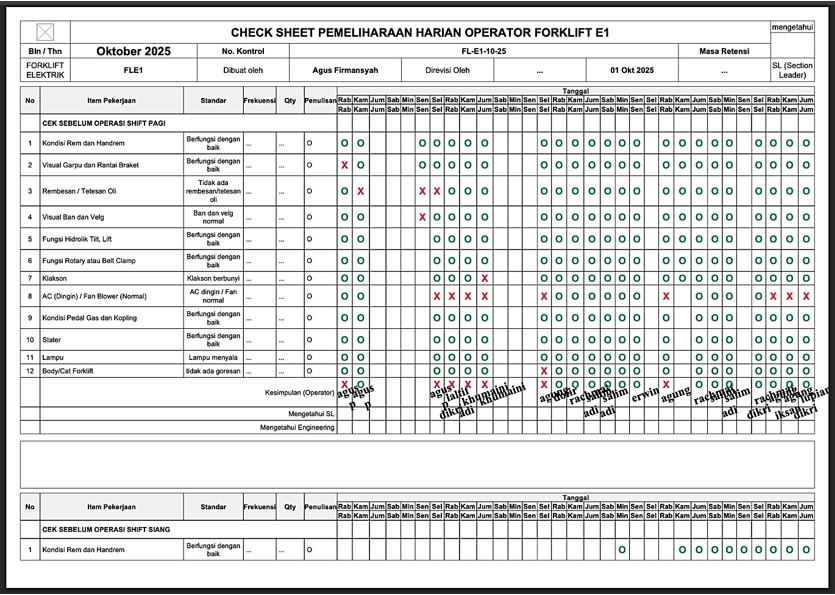
Checksheet Print Out